CLI Usage
The Rust moine command can download dictionary artifacts, compare Japanese and
Chinese strings, and render the reading lattice behind a comparison.
Basic Commands
Download the language artifacts you need:
moine download ja
moine download ja-unidic
moine download ja-sudachi
moine download zh
Inspect the local cache:
moine list
moine where ja
moine where ja-unidic
moine where ja-sudachi
moine where zh
Compare Japanese text through kana/romaji reading paths:
JA_DIR="$(moine where ja)"

moine compare \
  --left "もいにゃ" \
  --right "モイニャ" \
  --artifact-metadata "$JA_DIR/metadata.yaml"
Compare Chinese text through Mandarin pinyin paths:
ZH_DIR="$(moine where zh)"

moine chinese-compare \
  --left weishiji \
  --right "威士忌" \
  --artifact-metadata "$ZH_DIR/metadata.yaml"
Japanese Lattice Graphs
Install the explicit Japanese artifacts before comparing dictionary sources:
moine download ja-unidic
moine download ja-sudachi
--romaji-lattice writes the graph path. --output-format svg and
--output-format png call the Graphviz dot command; use
--output-format dot when you want DOT text without Graphviz.
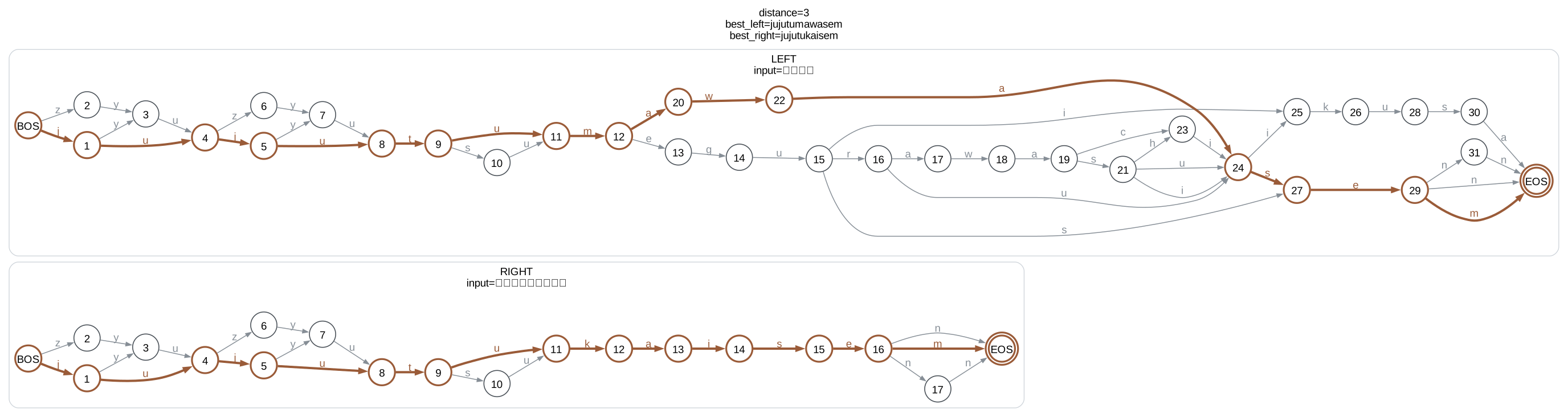
The pair below is useful for checking dictionary-source behavior. The kana input
is already readable as jujutukaisem, while the written title depends on the
dictionary reading paths available for 呪術廻戦.
UNIDIC_DIR="$(moine where ja-unidic)"

moine compare \
  --left "呪術廻戦" \
  --right "ジュジュツカイセン" \
  --artifact-metadata "$UNIDIC_DIR/metadata.yaml" \
  --romaji-lattice jujutsu-unidic.svg \
  --output-format svg
The UniDic-CWJ artifact does not provide a zero-distance title reading for this pair, so the best path remains three edits away:
source_name:        UniDic-CWJ
ja_dict_lattice: 3
ja_dict_lattice_best_path:
  left:  jujutumawasem
  right: jujutukaisem
Run the same comparison against the SudachiDict-full artifact:
SUDACHI_DIR="$(moine where ja-sudachi)"

moine compare \
  --left "呪術廻戦" \
  --right "ジュジュツカイセン" \
  --artifact-metadata "$SUDACHI_DIR/metadata.yaml" \
  --romaji-lattice jujutsu-sudachi.svg \
  --output-format svg
SudachiDict-full supplies a matching reading path, so the lattice distance is zero:
source_name:        SudachiDict
ja_dict_lattice: 0
ja_dict_lattice_best_path:
  left:  jujutukaisem
  right: jujutukaisem
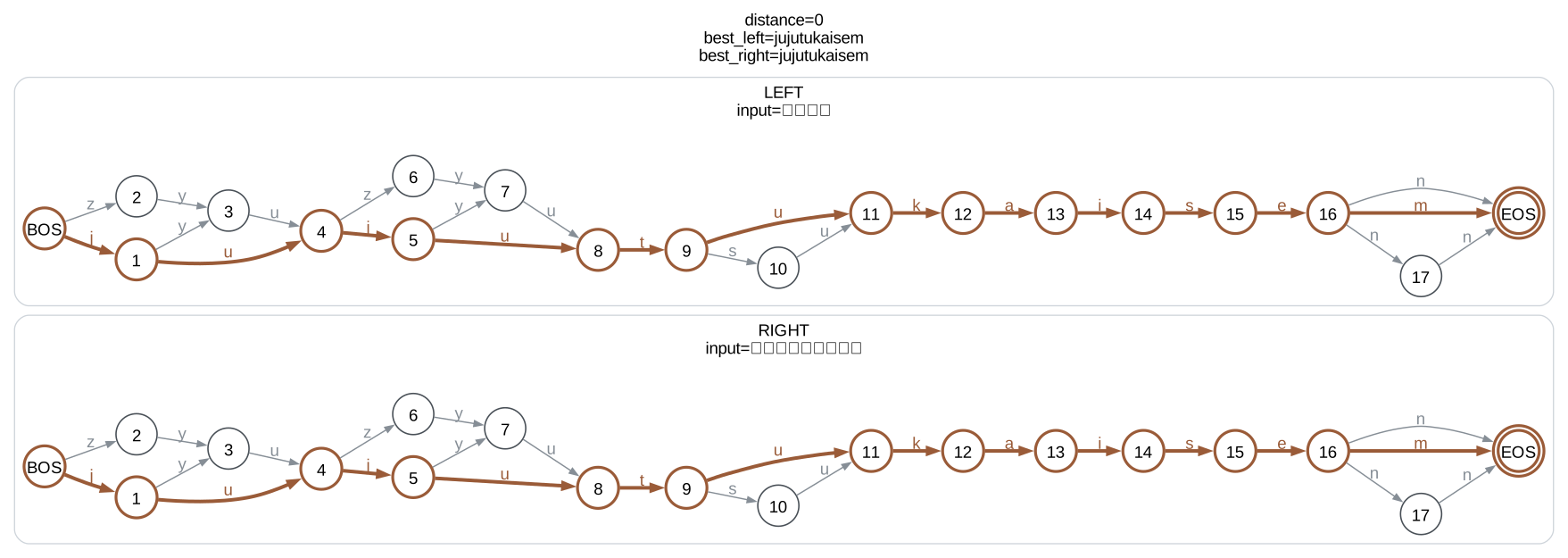
The highlighted route is the best aligned romaji path; muted arcs are alternate reading paths considered by the lattice.
Chinese Lattice Graphs
Chinese comparison uses the same lattice graph output over Mandarin pinyin paths.
The option name is --pinyin-lattice:
moine download zh
CEDICT_DIR="$(moine where zh)"

moine chinese-compare \
  --left tiaoheweishiji \
  --right "调和威士忌" \
  --artifact-metadata "$CEDICT_DIR/metadata.yaml" \
  --pinyin-lattice tiaoheweishiji-pinyin.svg \
  --output-format svg
This blended-whisky example is more useful than a single transcription because the written side expands to several pinyin paths:
pinyin_view: no-tone
right_expansion_paths: 6
cn_pinyin_lattice: 0
cn_pinyin_lattice_best_path:
  left:  tiaoheweishiji
  right: tiaoheweishiji
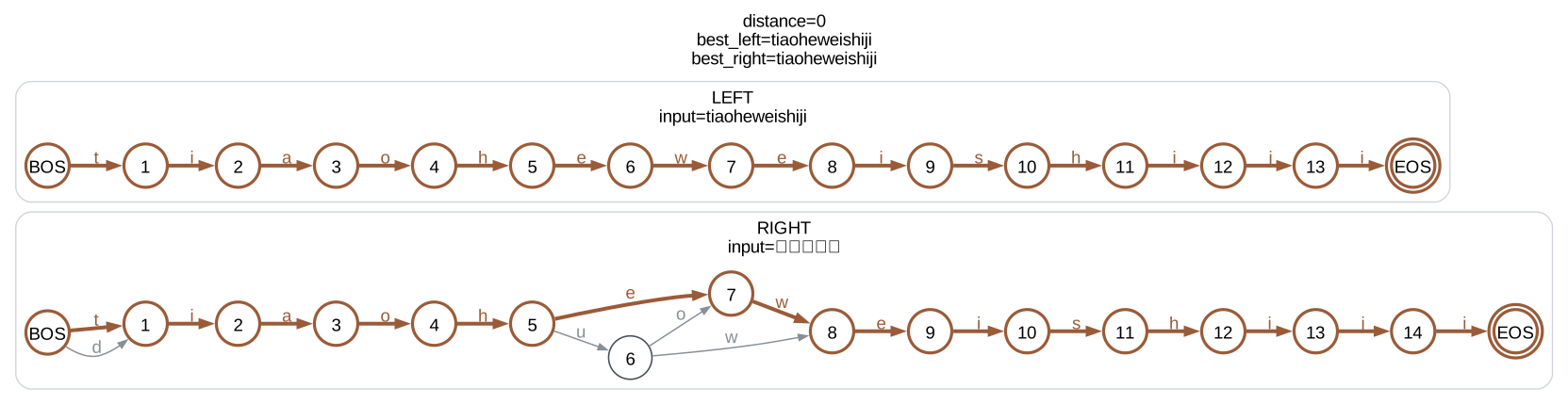
Chinese lattice graphs currently show Mandarin pinyin only. They do not model Cantonese or Jyutping readings.